Apple Earphones and EarPods with Remote and Mic - Apple Club |
Back to: 
Sections in this article: Volume Controls, Center Button, Microphone
Tweet

This article will explain how to use the Apple earphones with a remote and mic.
.




The volume up and volume down buttons are located at the top and bottom of the remote, of course, and are identified with their (+) and (-) symbols. The center button, in gray, has a wide variety of uses.
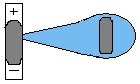
- Single click: Play/pause current track
- Double click: Go to next track
- Triple click: Go to previous track
- Click and hold:
- On an iPod: Will speak your current song title
- On iOS: Will open Voice Control / Siri
- On an iPod shuffle: Change playlist
- Click and hold until you hear a tone, then click to select the playlist you want when the playlist title is spoken


The microphone is located on the back of the remote. The built-in mic is great when making calls, talking to Siri, and more while the headphones are plugged in. On the newer earphones, EarPods (right), the microphone is not visible on the exterior, but it still has a microphone.
The remote and mic can be found just below the right earphone. The volume controls on EarPods are bigger than they are on the older headphones. The tiny slots on the head of the EarPods have air flowing through them. By allowing air to flow, the speakers can move more freely, allowing for greater, richer sounding bass. There is a speaker on the face of the earbud and one on the side that sends sound directly to your ear drum.
| Back: |
Ask: |
Rate:
 |
Share: |
Print: |
Article ID: AA1012
|
Previous Article |
Next Article |
|
App Store: Downloading Older Versions of Apps |
Apple ID is Disabled |
Overall User Rating: [1 RATING]
Comments (1):
By Anonymous32 on 2/09/13 • Reply
Finally I know how to use the ear pods I got with my new iPhone 5....THANK YOU SO MUCH...
GREAT tutorial...'Mrs T
By Anonymous32 on 2/09/13 • Reply
Finally I know how to use the ear pods I got with my new iPhone 5....THANK YOU SO MUCH...
GREAT tutorial...'Mrs T