Camera Shortcut on the Lock Screen - Apple Club |
Back to: 
Tweet

Just a note, as this is a popular question: The shortcut cannot be removed if you are running iOS 5.1 or later.
With the iOS 5.1 update, the camera shortcut icon on the lock screen has been changed. This article will explain how to use it on both iOS 5.0 and 5.0.1, as well as iOS 5.1 and later.
Camera on iOS 5.0 or 5.0.1
The camera shortcut does not always appear on the lock screen in iOS 5.0 or 5.0.1. You have to double tap on the
With the iOS 5.1 update, the camera shortcut icon on the lock screen has been changed. This article will explain how to use it on both iOS 5.0 and 5.0.1, as well as iOS 5.1 and later.
Camera on iOS 5.0 or 5.0.1
The camera shortcut does not always appear on the lock screen in iOS 5.0 or 5.0.1. You have to double tap on the
home button , and then the camera icon will appear. Tap on this and the camera will launch. (Click to see animation again)

Camera on iOS 5.1
There is an entirely different way to access the camera from the lock screen on iOS 5.1. First, you will notice that the camera icon will always appear on the lock screen, and there is no need to double tap. However, tapping on this icon will not take you to the camera up. Instead of tapping, you must slide the screen from bottom to top on the camera icon.
(Click to see animation)

Security of the Camera Shortcut
If you are worried about anyone being able to view your photos or access other data on your device, rest assured, they cannot. When you access the camera from the lock screen, you will be returned to the lock screen when you are done. You still cannot get into the device without unlocking it using your passcode (if you have one). If you try to view photos while accessing the camera from the lock screen, you will not be able to view them and will see a prompt to unlock your device. The only photos you can see are photos you have just now taken from the lock screen shortcut.


, and then the camera icon will appear. Tap on this and the camera will launch. (Click to see animation again)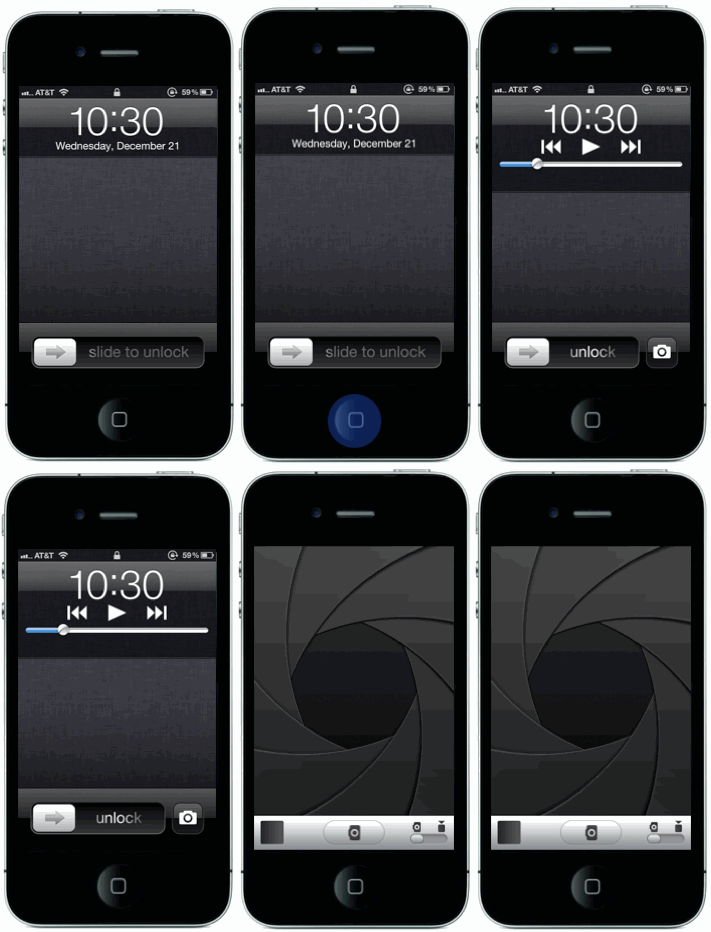

Camera on iOS 5.1
There is an entirely different way to access the camera from the lock screen on iOS 5.1. First, you will notice that the camera icon will always appear on the lock screen, and there is no need to double tap. However, tapping on this icon will not take you to the camera up. Instead of tapping, you must slide the screen from bottom to top on the camera icon.
(Click to see animation)

Security of the Camera Shortcut
If you are worried about anyone being able to view your photos or access other data on your device, rest assured, they cannot. When you access the camera from the lock screen, you will be returned to the lock screen when you are done. You still cannot get into the device without unlocking it using your passcode (if you have one). If you try to view photos while accessing the camera from the lock screen, you will not be able to view them and will see a prompt to unlock your device. The only photos you can see are photos you have just now taken from the lock screen shortcut.
| Back: |
Ask: |
Rate: |
Share: |
Print: |
Article ID: AA1016
|
Previous Article |
Next Article |
|
Buttons and Hardware on Your iOS Device |
Charging Your iOS Device |
Overall User Rating: [NO RATINGS]