Viruses, Malware and Adware on the Mac - Apple Club |

Tweet

Are there really no viruses on the Mac?
Malware on the Mac
- MacKeeper is actually anti-virus software, however, also may cause serious lag or harm to your Mac
- Users have reported MacKeeper slowing down their Mac, as well as making certain Apple and other programs crash or unable to open
- It is unethically marketed and is essentially a scam
- It has been subject to two lawsuits for identifying every system as "infected" whether it is or not, and pushing their paid services
- Norton for Mac has been reported to delete critical system files on macOS
Software that can harm your Mac, or have a very bad reputation:
- MacKeeper
- Norton for Mac
- MacDefender (is actually malware)
- MacProtector
- MacSecurity
Software that has a good reputation and will not cause harm to your Mac:
- ClamXav
- Sophos
Built-in Protection
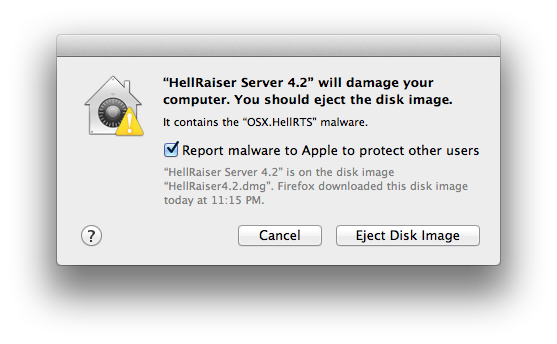
macOS has built-in technologies to combat malware. One example is XProtect, which is included in Mac OS X Snow Leopard (10.6) and later. XProtect updates its malware definitions frequently, and will inform you if you are trying to open an installer package which contains known malware. For example:
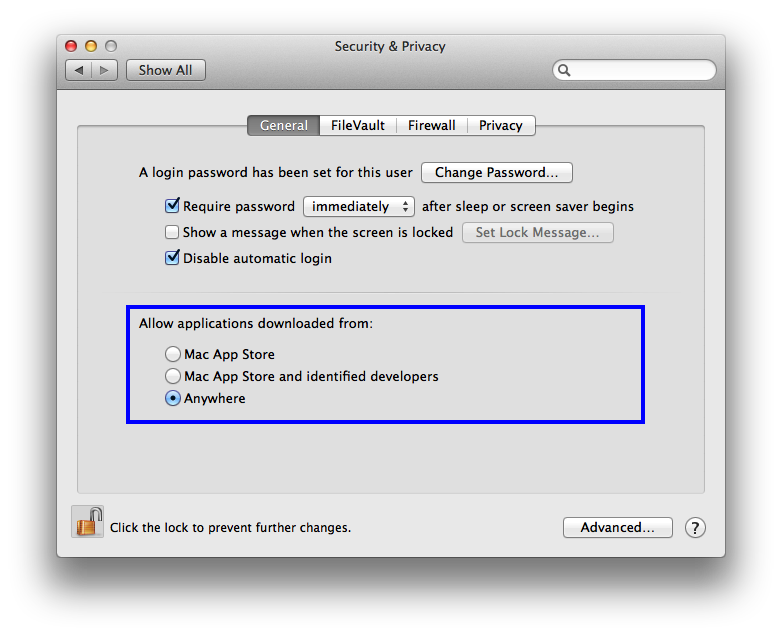
The safest method to use is Mac App Store only. Since Apple maintains the Mac App Store and apps must be approved before they appear in the store, you have assurance that it is safe. Apps are also sandboxed, which limits the files and data they can access on the system and from other apps. The setting mentioning identified developers will allow you to download applications from sources outside of the Mac App Store, as long as Apple recognizes the developer who is offering the app (if they have registered for a developer account). The "Anywhere" setting can be used if you trust an application, but the developer is unidentified. If you need to open an application that Gatekeeper blocks, and you are confident it is trustworthy, right click and then click on Open.
Note that just because a developer is unidentified does not mean that their apps are unsafe. To get a Developer ID, one must enroll in Apple's Developer Program, which costs $99/year, and smaller developers might not be able to afford this. Likewise, just because a developer is identified does not mean that their apps are safe. Authors of questionable programs can still sign their apps with their own developer ID, or even use someone else's in theory; Apple can suspend developer IDs but this is not always a timely process.
More on MacKeeper:Above all, if you download the "trial" of MacKeeper, it will claim that your computer is infected regardless of what's on it, even on a brand new, out-of-the-box Mac, which will require paying for the product to remove. Zeobit is facing two class-action lawsuits because of this practice.
So yes, technically, MacKeeper qualifies as malware, in the sense that malware is "a general term used by computer professionals to mean a variety of forms of hostile, intrusive, or annoying software." Whether it is considered malware or not, MacKeeper is definitely a steer-clear piece of software.
Conclusion
Macs do not have viruses. Most malware out there is pretty lame and easy to spot. Anti-virus software for Mac, even if you find a safe program, is unlikely to pick up malware if you do manage to get infected. It is better not to install any anti-virus software, as it will bloat up your system. If something is going wrong with a Mac, some are quick to believe they have been infected, however there are several more likely possibilities. For example, email spoofing is done by hacking into mail servers (i.e. Google Mail (Gmail), Yahoo!, etc.) and not your computer, or by making it appear to have you as the sender when that is not actually the case. Third-party software conflicts may also be another cause for problems on a Mac. A slow Mac does not mean you have a virus. If you use safe web browsing practices, you greatly reduce the risk of getting malware.
As a reminder, if you see a pop-up that you cannot close and claims that your computer is infected, or a similar message, see this article: A Browser Pop-up has Taken Over Safari.
| Back: |
Ask: |
Rate:
 |
Share: |
Print: |
|
Previous Article |
Next Article |
|
Uploading Photos to the iPad with the Camera Connection Kit |
Volume Feedback has no Sound in OS X 10.10 or Later |
|
|
Related Articles |
Related Questions |
|
A Browser Pop-up Scam has Taken Over Safari |
No related questions found |

By danpage9 on 2/25/14 • Reply

Sent from my iPad