Yosemite and Later: Adding Ringtones and Alert Tones - Apple Club |
Back to: 
Tweet

OS X Yosemite (10.10) and later do not have a dedicated method to add custom ringtones or alert tones, but it's still possible. This article will show you how. This article is for adding ringtones to Macs only. Adding ringtones to an iPhone or other iOS device is as simple as syncing through iTunes.
First, make sure you have a ringtone, in .m4r format.
Ringtone Adder
If the procedure below seems too cumbersome, we have a $2.99 application that can add ringtones for you. You will still need to disable System Integrity Protection if you have OS X 10.11 or later.

Adding the Ringtone
After you have the .m4r file(s) ready, you'll need to go to the system Ringtones folder. To do this, locate the Finder's "Go" menu in the menu bar, and click Go To Folder. You can also press Command + Shift + G.
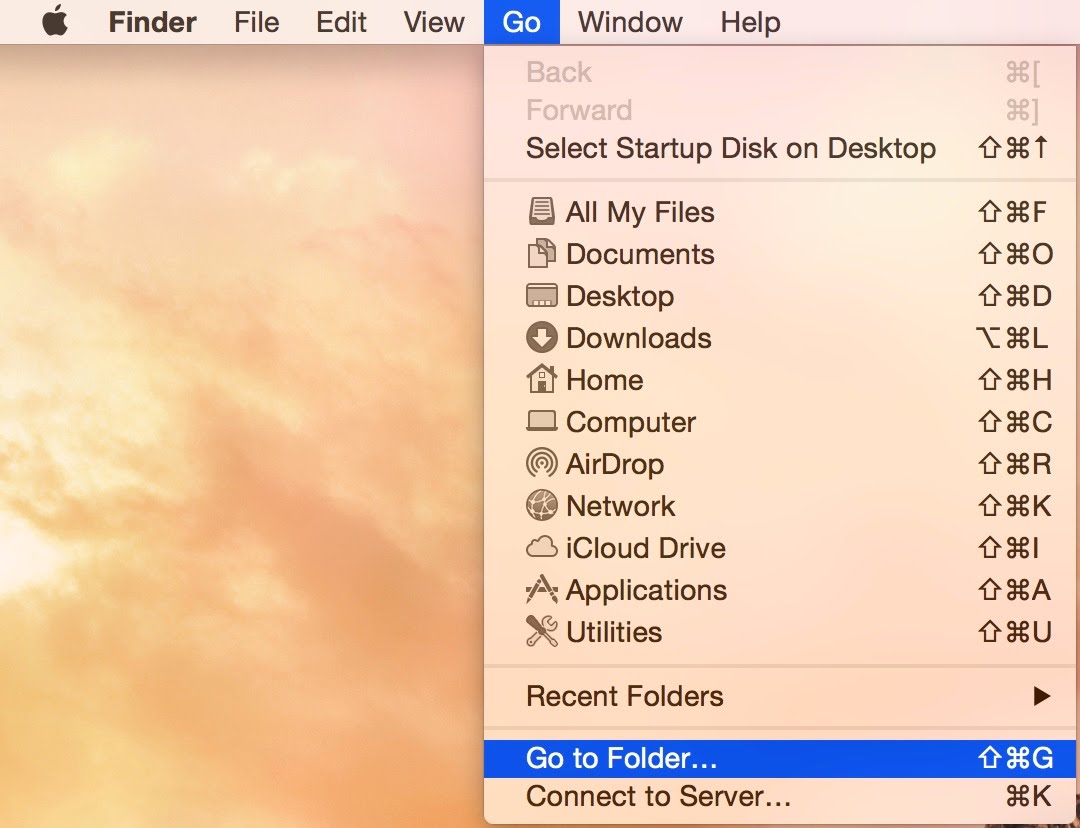
Paste the below line into the resulting input box.
/System/Library/PrivateFrameworks/ToneLibrary.framework/Versions/A/Resources/Ringtones
This is the folder that you should copy the tone into. You will be asked for your user password to authenticate when you add the tone. However, the tone will still not show up in the list of tones at this point.
System Integrity Protection
If you are running OS X El Capitan (10.11) or later, you might not be able to add or modify any folders in the "System" directory due to Apple's technology called System Integrity Protection. In order to add the ringtones, whether you are using this procedure to do it yourself or using Ringtone Adder, SIP will need to be disabled. See What is System Integrity Protection? for more information.
Getting the System to Recognize the Tone
Getting the OS to recognize any newly added tones involves altering the contents of a .plist file. Using Finder's Go To Folder feature again, paste the following line into the input box:
/System/Library/PrivateFrameworks/ToneKit.framework/Versions/A/Resources
Open the file TKRingtones.plist. It should open in TextEdit. Next, go to File > Duplicate, or press Command + Shift + S, since the original file is locked.
You will notice that there are lines in the file that look like, for example: <string>system:Apex</string>. Simply add a new line that says <string>system:[your tone name]</string>.
Make sure that:
- The name you enter in this file matches the file name of the tone you added, case sensitive, and including spaces
- You add the line under the "Modern" section (underneath where it says <key>modern</key>)
- If you add it under the "Classic" section, you will have to select the "Classic" menu when selecting a ringtone to assign
- You don't have any ringtones whose names have special characters, i.e. the "&" sign
When you are done, save the file. Delete "copy" from the name (so it matches the original file name), and add the extension ".plist" to the end. Save it to the desktop. Then, reopen the Finder window with the "Resources" folder, and drag the newly created file to that folder. You should receive a prompt which says that a file with that name already exists. Choose "Replace." You will then be asked to enter your password again.
After this, the new tone is ready to be added. You can set alert/ringtones in Contacts, FaceTime, Messages, Mail, etc. If your new tones do not show up in the selection when changing the tone in any of these applications, quit the application and restart it.
Tone Requirements
The .m4r ringtone must be a minimum of one second long. There is no maximum length. If you have a ringtone that is less than one second long, you can use a program that can edit audio to make the ringtone longer by adding silence to the end. If the ringtone is more than 30 seconds long, you can use it, but a preview will not be played when you select it in the dropdown menu of the application you are setting the ringtone in (such as FaceTime, Messages or Contacts).
Changing Sounds that won't Let you Select a Tone
While you can set tones for individual contacts, and some applications' preferences will let you pick alert tones, not all sounds are customizable. For example, you can choose what sound plays when you receive a new text in the Messages application, but there is no setting to change the sound for a sent message. You can still change it, however.
Still using Messages as an example, go to the Applications folder and right click the Messages icon. Select "Show Package Contents."
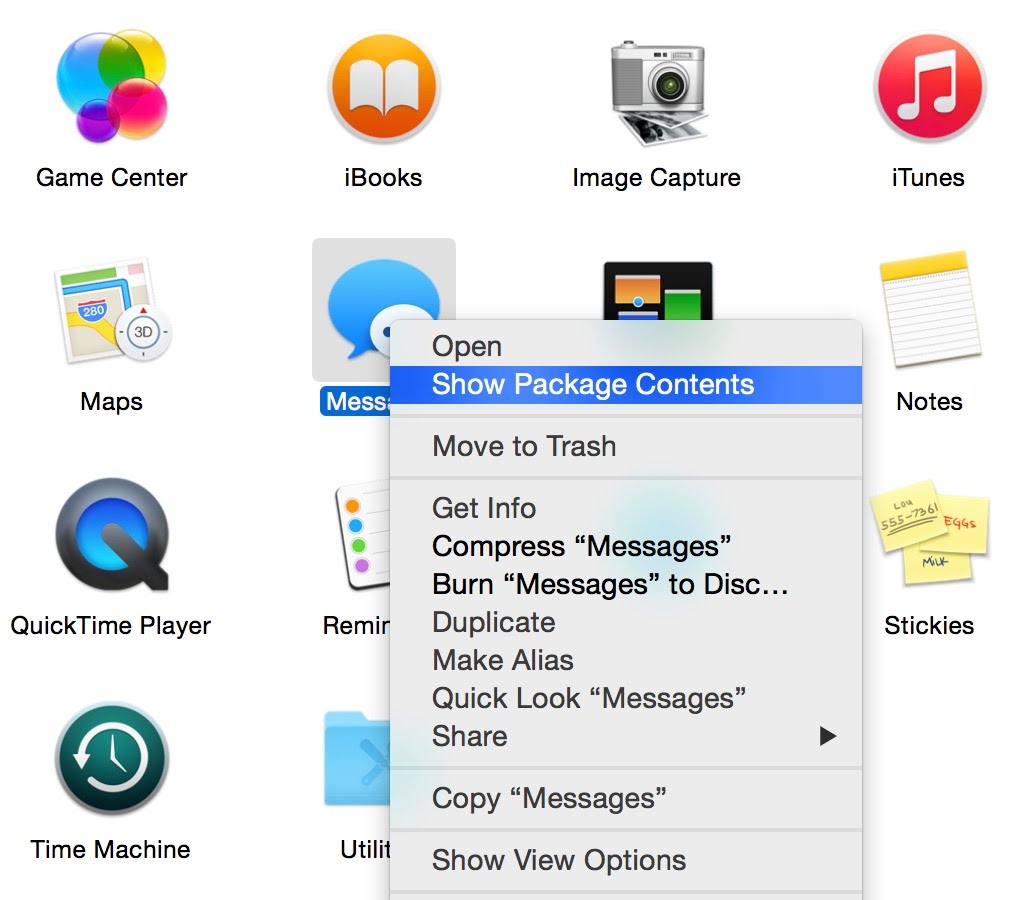
Then, go to the Contents folder, and then Resources. In the case of Messages, the file is "Sent Message.aiff." Name the tone file you want to use the exact same name, with the same extension, and drag it to the same folder. You will get a pop-up asking if you want to replace the existing file. Click "Replace." Messages should then use the new tone. If Messages is open when you make the change, quit and re-open it.
This procedure works for other applications, too (select Show Package Contents, etc.), and also works in older versions of OS X.
| Back: |
Ask: |
Rate:
 |
Share: |
Print: |
Article ID: AA1106
|
Previous Article |
Next Article |
|
Will My Applications Work when I Upgrade macOS? |
There is no next article |
|
|
Related Articles |
Related Questions |
|
No related articles found |
Yosemite - how to change iCal's default alert tone |
Overall User Rating: [4 RATINGS]

Comments (58):
By TimM01835 on 11/15/14 • Reply
I added the ringtone, it shows up in my list, but when i receive a call it's silent. When I go to preview the tone, it plays. Not sure what I did wrong. Any ideas?
in response to TimM01835
Hi Tim,
We'll look into this and get back to you. When you say that the tone works when you preview it, how are you previewing it? By clicking on the ringtone file, or by selecting it from the tone drop-down list? Also, when you get a call and there's no sound, is it from someone in your contacts list?
in response to AppleClubSupport
By TimM01835 on 11/15/14 • ReplyI previewed it in tunes and selecting it in finder. Facetime doesn't
recognize sound from it. Good question about the person being in my
contacts. I'll try that and report back.
By PhilA on 12/23/14 • Reply
This worked for me except that there is no preview of the ringtone when selecting it in FaceTime>Preferences. All the other ringtones "make noise" but my custom one is silent. However it does work when I receive a call - which is the main thing!
This worked for me except that there is no preview of the ringtone when selecting it in FaceTime>Preferences. All the other ringtones "make noise" but my custom one is silent. However it does work when I receive a call - which is the main thing!
By Vradico on 12/28/14 • Reply
Great article, completely functional.
Great article, completely functional.
By Jasper on 1/13/15 • Reply
How do we get this on our phone?
How do we get this on our phone?
in response to Jasper
This article is for OS X Yosemite users, not for iPhone users.
To add them to an iPhone, you need to open iTunes, click on "•••" near the upper left of the window, and select Tones, then drag the ringtone files there. Then you can plug in your iPhone and sync them to your phone.
By bee on 1/13/15 • Reply
Hey!
I've followed your tutorial and I've found that when selecting the tone it doesn't play a preview nor does it sound when set as my tone. It's completely muted. Any idea why this may be?
Thanks a heap for this tutorial though!!
Hey!
I've followed your tutorial and I've found that when selecting the tone it doesn't play a preview nor does it sound when set as my tone. It's completely muted. Any idea why this may be?
Thanks a heap for this tutorial though!!
in response to bee
Hi bee,
Sorry if you've already checked this, but is your system sound muted? If not, then quit the app that you were trying to select the ringtone in and re-launch it. We've also seen cases where the ringtone won't play when the user selects it, but when they receive a notification from someone, the ringtone will play. Maybe you can ask someone to call you and see if it rings.
in response to AppleClubSupport
By bee on 1/14/15 • ReplyI've checked everything and it's on iMessage so I've gotten a friend to
message me and no sound goes off when it's alerting me. I've tried the
other tones and they work fine. There is also the problem where I try to
add it as an alert tone rather than a ringtone (in the correct format
too) and what I find it does is that it stops me from accessing
preferences for iMessage.
Not really sure what's going on!
Not really sure what's going on!
in response to bee
Ah, that could be a problem. Even if you want to use the tone as a text tone, you still need to add it as a ringtone as opposed to an alert tone. Undo any changes you've made thus far, and then try adding the file to the Ringtones folder in ...ToneLibrary.framework/Contents/Resources, and modifying TKRingtones.plist, and see if it works. It's .m4r format and not .caf (the alert tone format), correct?
in response to AppleClubSupport
By bee on 1/15/15 • ReplyWhich I have done so, I've re-tried adding it as a ringtone as per your
tutorial over and over but I'm getting the same results. Yep, it's in
m4r format. I've also tried restarting the app itself along with my
macbook, no change in result.
It's not a huge deal if I'm unable to use the tone, it's just that I want to try and figure out what may be the issue.
It's not a huge deal if I'm unable to use the tone, it's just that I want to try and figure out what may be the issue.
in response to bee
I have to say, I'm at a loss as to what the issue might be. If you want, you can send the ringtone file to appleclubpublic@icloud.com, and we can test it out just to make sure it's not an issue with the file.
in response to AppleClubSupport
By bee on 1/22/15 • ReplySorry about the delayed response, I have just emailed to the address you
have mentioned. Hopefully we can get to the bottom of it!
in response to bee
By AppleClubSupport on 1/23/15 • ReplyWe sent you a reply to your email detailing the issue, but basically, we discovered that the tone must be at least one second long to work, and have added that to our article here.
By robshort on 1/15/15 • Reply
I tried it as the tutorial instructed, but it caused problems like the Messages app refusing to open at all or, if it did open, preferences would either show *no* sounds under the sound drop-down.
What I ended up doing was restoring the original TKRingtones.plist, then opening terminal, changing the directory to /System/Library/PrivateFrameworks/ToneKit.framework/Versions/A/Resources, then issuing "sudo vi TKRingtones.plist".
When I did it the suggested way, not only were the user and group permissions for the file *not* the same as the original file, but the file had extended attributes (indicated by the "@" at the end of the file permissions that "ls -l" returned) that included "text encoding," meaning that whatever I'd used to edit the file had changed the text encoding.
My best guess is that the different encoding of the file, imposed by BBEdit (which is what opens .plist files by default on my system) is what caused my errors.
I tried it as the tutorial instructed, but it caused problems like the Messages app refusing to open at all or, if it did open, preferences would either show *no* sounds under the sound drop-down.
What I ended up doing was restoring the original TKRingtones.plist, then opening terminal, changing the directory to /System/Library/PrivateFrameworks/ToneKit.framework/Versions/A/Resources, then issuing "sudo vi TKRingtones.plist".
When I did it the suggested way, not only were the user and group permissions for the file *not* the same as the original file, but the file had extended attributes (indicated by the "@" at the end of the file permissions that "ls -l" returned) that included "text encoding," meaning that whatever I'd used to edit the file had changed the text encoding.
My best guess is that the different encoding of the file, imposed by BBEdit (which is what opens .plist files by default on my system) is what caused my errors.
By danR on 2/12/15 • Reply
I thought sounds on Macs for a long time had to be in .aiff format. Has that changed?
I thought sounds on Macs for a long time had to be in .aiff format. Has that changed?
in response to danR
Hi danR,
Typically, sounds that are associated with a system application are in .aiff format. The files discussed in this article are in a system framework, which is system-wide, and although they are indeed in .m4r format, this is not the norm.
By Axanar on 3/12/15 • Reply
Hello all, So I was successful in changing/adding all the sounds I wanted except for one: the "Sent Message.aiff" file for the Messages app.
I was able to change the Received Message file and although I added a new Sent Message file (and deleted the original) it still continues to play the original 'whoop' sound!! I've tried searching all of the sound libraries that I know of to make sure there isn't a duplicate of the sound anywhere and there don't seem to be any. I even tried re-adding my desired sound to Messages' Resources folder, and I've double checked my spelling a hundred times.
Does anyone have any idea what the problem could be?
Thank you for your time!!
Hello all, So I was successful in changing/adding all the sounds I wanted except for one: the "Sent Message.aiff" file for the Messages app.
I was able to change the Received Message file and although I added a new Sent Message file (and deleted the original) it still continues to play the original 'whoop' sound!! I've tried searching all of the sound libraries that I know of to make sure there isn't a duplicate of the sound anywhere and there don't seem to be any. I even tried re-adding my desired sound to Messages' Resources folder, and I've double checked my spelling a hundred times.
Does anyone have any idea what the problem could be?
Thank you for your time!!
in response to Axanar
Hmm... it seems that, for this particular sound (Sent Message.aiff), you also need to change the sound in /System/Library/PrivateFrameworks/MessagesHelperKit.framework/PlugIns/AlertsController.bundle/Sent Message.aiff. Just replace the file with one of the same name, like you did in the Messages resource folder.
in response to AppleClubSupport
Hey, thank you for your reply! I just tried this out, I found and
changed the other Sent Message file, making sure that everything is
spelled correctly, proper format, and all that. Replaced the default
sound with my sound, and it *still* plays the default.
I even double checked to make sure that it was my sound in there, and double checked the Messages package contents to make sure that it also matched what I wanted. Is there possibly anywhere else that default sound is hiding? It couldn't be looking in my Time Machine for it could it??
Thanks again!
I even double checked to make sure that it was my sound in there, and double checked the Messages package contents to make sure that it also matched what I wanted. Is there possibly anywhere else that default sound is hiding? It couldn't be looking in my Time Machine for it could it??
Thanks again!
in response to AppleClubSupport
Just wanted to let you know, the sound is working now! I'm on my
computer again this morning, and I'm thinking that it was just a matter
of restarting the computer after making that additional change you told
me about, because I had tried restarting it before I made that change
with no effect so I guess I just didn't think about it this time around.
in response to Axanar
That is great news!
in response to AppleClubSupport
So I'm having the exact same issue here. Mail settings for changing the AIFFs worked just fine, but message won't use the it for sent - just incoming. I went to /System/Library/PrivateFrameworks/MessagesHelperKit.framework/PlugIns/AlertsController.bundle/
And there aren't actually any AIFFs in there to "replace" as you noted. Should I just put a copy in?
By Texican1911 on 3/12/15 • Reply
Ok, I did all the things listed above, including changing the TKRingtone files. Works, shows up like it should, owned by system, yatta yatta. Thanks for how to do all that.
Here's where the problem is. I have the same ringtone/text tone combo for my girlfriend on my phone and on the computer. But when I set one, the other (phone/computer) reverts to default immediately. Change the ringtone on the phone, the ringtone on the contact on the computer changes to "opening". Change the ringtone on the computer BACK to the right ring tone, the phone changes to "opening". It's instantaneous. If I turn wifi off and do it, as soon as I turn wifi back on it does it. The tones have the same name, what is going on?
Ok, I did all the things listed above, including changing the TKRingtone files. Works, shows up like it should, owned by system, yatta yatta. Thanks for how to do all that.
Here's where the problem is. I have the same ringtone/text tone combo for my girlfriend on my phone and on the computer. But when I set one, the other (phone/computer) reverts to default immediately. Change the ringtone on the phone, the ringtone on the contact on the computer changes to "opening". Change the ringtone on the computer BACK to the right ring tone, the phone changes to "opening". It's instantaneous. If I turn wifi off and do it, as soon as I turn wifi back on it does it. The tones have the same name, what is going on?
in response to Texican1911
Hi Texican1911,
It could in fact be an issue with the ringtone having the same name. Try renaming it and see if the changes stay on both.
in response to AppleClubSupport
By Texican1911 on 3/12/15 • ReplyDid it. It changed the tone names on the phone to the same name as in
the contact folder on the computer (which don't exist on the phone) so
clicking on them pulled up having "opening" being checked.
in response to AppleClubSupport
By Texican1911 on 3/12/15 • ReplyI wonder if it has something to do with the custom tones on the phone
not being in the modern or classic category, but broken out in their own
category.
in response to Texican1911
By Texican1911 on 3/12/15 • ReplyYou might not have seen my replies but here is more info, if I change
the tone selection to any factory tone, they both sync up. But if I
change it to a custom tone on either device, the other device switches
to default.
in response to Texican1911
By AppleClubSupport on 3/12/15 • ReplyI'm afraid I don't have an explanation for this. The only other suggestion I could offer is to delete the contact entry for your girlfriend and then recreate it.
in response to AppleClubSupport
By Texican1911 on 3/12/15 • ReplyTried that just now. No joy. Thanks for trying
in response to Texican1911
By michaelchira on 1/04/16 • ReplyStill no luck? I'm having the exact same problem, how can I fix this?
in response to Texican1911
Hello everyone,
It has been a while, but if you are experiencing this issue, I would recommend filing a bug report with Apple, which you can do at this link: http://apple.com/feedback/macosx.html. We recently had a question submitted where the user encountered the same issue, but it was with two iOS devices: 💬Ringtone problem. This would suggest that the problem may not be related to the workaround in this article to add ringtones to your Mac, but is in fact a bug that Apple may need to look into.
By MaxCrack on 3/19/15 • Reply
What a pain in the ***. What ever happened to, "It just works?"
Thank you for this write up, I was able to get my old custom alert back into Messages and I can actually notice that I got a message again.
What a pain in the ***. What ever happened to, "It just works?"
Thank you for this write up, I was able to get my old custom alert back into Messages and I can actually notice that I got a message again.
By Duopshebop on 5/08/15 • Reply
I did everything this post says, but its just not working either as a preview tone or a ringtone on FaceTime or Continuity.
I did everything this post says, but its just not working either as a preview tone or a ringtone on FaceTime or Continuity.
in response to Duopshebop
Hi Duopshebop,
When you edited the contents of the TKRingtones.plist file, did you copy the name of the ringtone file exactly, including lower/upper case, and any special characters such as dashes, parentheses, etc.?
in response to AppleClubSupport
By Duopshebop on 5/09/15 • ReplyI am trying to rate this with 5 stars but it doesn't work. :)
in response to AppleClubSupport
By Duopshebop on 5/09/15 • ReplyJust realized that your response said the exact same thing I learned on the other forum, but as I had not included my email address at that time, I just now saw your response. Anyway, YES, that was the problem as the file name seemed to have added extra characters. So when I made them match, it worked perfectly!
in response to Duopshebop
Glad to hear it's working now! We can manually input a rating.
By cdorschel on 7/09/15 • Reply
For those who cannot hear a ringtone preview when selected, I found the solution. Ringtones that are 48000 Hz in stereo will preview in FaceTime, those that were 44000 Hz in mono would not. I changed one that wouldn't preview when selected to match the ringtones that would (48000 Hz stereo), and voila! It seems the ringtone should be at 48000 Hz and in stereo. You can use VLC player (free online) to open a ringtone, then select "Window" in VLC's menubar, then "Media Information". In the window that appears, select "Codec Details" to check the media format. I used another application to modify the ringtone's settings, there are plenty out there.
Hope this helps!
For those who cannot hear a ringtone preview when selected, I found the solution. Ringtones that are 48000 Hz in stereo will preview in FaceTime, those that were 44000 Hz in mono would not. I changed one that wouldn't preview when selected to match the ringtones that would (48000 Hz stereo), and voila! It seems the ringtone should be at 48000 Hz and in stereo. You can use VLC player (free online) to open a ringtone, then select "Window" in VLC's menubar, then "Media Information". In the window that appears, select "Codec Details" to check the media format. I used another application to modify the ringtone's settings, there are plenty out there.
Hope this helps!
in response to cdorschel
Hi cdorschel,
That is an excellent discovery! Thank you for sharing. We will add a note about this in our article.
By sbiml on 7/19/15 • Reply
UPDATE: SORRY ABOUT SENDING THIS. JUST REALIZED "SYNC TONES" IN ITUNES WAS NOT CHECKED. Great writeup with clear directions. Thank you! I added 4 ringtones to my "classic" collection then, in Contacts, assigned three of them to certain people. The 4th one is to be my default ringtone. Problem is: none of the 4 show up on the iPhone's list of ringtones. I did a sync of the phone to computer and did a reboot of the phone but I still can't find them. (Yes, they are on the macbook.) Any thoughts?
UPDATE: SORRY ABOUT SENDING THIS. JUST REALIZED "SYNC TONES" IN ITUNES WAS NOT CHECKED. Great writeup with clear directions. Thank you! I added 4 ringtones to my "classic" collection then, in Contacts, assigned three of them to certain people. The 4th one is to be my default ringtone. Problem is: none of the 4 show up on the iPhone's list of ringtones. I did a sync of the phone to computer and did a reboot of the phone but I still can't find them. (Yes, they are on the macbook.) Any thoughts?
By lulighttec on 7/27/15 • Reply
Ok, so I have tried everything on this page except renaming tones to the original system tone names, which I would rather not do. Anytime I make changes to the .plists, my faceTime Preferences window is completely blank when I open it, and Messages just displays no audio filenames at all in the drop down. I tried chowning the modified files to root, as well as the ringtones, but that didn't make a bit of difference. In fact, when I replaced the .plists with the originals to get my preferences back, I was listed as the owner of those and they still worked. I really don't know what else to do. It's just not working. Any ideas would be really helpful.
Ok, so I have tried everything on this page except renaming tones to the original system tone names, which I would rather not do. Anytime I make changes to the .plists, my faceTime Preferences window is completely blank when I open it, and Messages just displays no audio filenames at all in the drop down. I tried chowning the modified files to root, as well as the ringtones, but that didn't make a bit of difference. In fact, when I replaced the .plists with the originals to get my preferences back, I was listed as the owner of those and they still worked. I really don't know what else to do. It's just not working. Any ideas would be really helpful.
in response to lulighttec
By AppleClubSupport on 7/27/15 • ReplyWhat application did you use to edit the .plist file? TextEdit? I suggest that you download and run Ringtone Adder, and let it add the ringtones for you, to rule out the possibility of user error.
in response to AppleClubSupport
By lulighttec on 7/28/15 • ReplyI would prefer not to use the ringtone adder. I am quite a meticulous
person, and I'd rather figure out what's going on. Originally I used
TextEdit, but after there seemed to be problems, I replaced the original
files and tried again with vi(m). Same result. I also looked at the
possibility that it could be related to TextEdit saving the file in
ASCII instead of UTF-8, but saving in UTF-8 didn't make a difference.
in response to AppleClubSupport
By lulighttec on 7/29/15 • ReplyNevermind; found the problem. Capital letter where there shouldn't have
been one in TKRingtones.plist name. All working now. Thanks.
in response to lulighttec
By lulighttec on 7/30/15 • ReplyUPDATE: I am having the exact same problem as texican1911! If I set a
ringtone on a contact on the laptop(s), it will not use the same
ringtone for my phone, even though the phone's contact says it is set
for the same ringtone! If I set it on the phone, it proceeds to revert
the other device to the default ringtone!
Just tried this on El Capitan and also applied the same principles to add ringtones to TKAlertTones.plist. Now, whenever I try and open Contacts on my Mac it crashes immediately? Calendar and Reminders work fine, but Contacts crashes every time. Any ideas please? Do I need to reinstate SIP? Change permissions on the revised TKRingtones and TKAlertTones plists?
Thanks
in response to TheDogzBollox
By AppleClubSupport on 10/08/15 • ReplyHi TheDogzBollox,
Thank you for the question. This is because you modified TKAlertTones.plist. The way the OS reads that file is completely different from TKRingtones.plist. For example, the alert tone filenames are formatted like sms_alert_[tone name].caf, whereas for ringtones, it is just [tone name].m4r. The solution is to just add both ringtones and alert tones to the Ringtones folder, and modify only TKRingtones.plist. Modifying TKAlertTones.plist in any way seems to cause the programs that use it to crash.
I completed all of the steps up until drag the folder into the resource folder. It will not let me drag the file into this folder. Any clue why?
in response to nigraha
By AppleClubSupport on 12/17/15 • ReplyYes, see the "System Integrity Protection" section in the article.
By iMakeAppleProducts on 7/01/16 • Reply
Hey, what's up! Can I disable System Integrity Protection, add the ringtone then enable System Integrity Protection again? I read some articles that System Integrity Protection is very important.
Hey, what's up! Can I disable System Integrity Protection, add the ringtone then enable System Integrity Protection again? I read some articles that System Integrity Protection is very important.
Yes, you can make the changes and then re-enable it. However, the notion that it's super important to leave it enabled is just the opinion of those authors. We believe that it's not important at all, at least at this time, and it will get in your way (such as when you want to add ringtones) more than it will help. SIP is designed to protect against a threat that does not yet exist. They believe that in order to stop malware from accessing system files, they should just take a blanket approach and not let anyone access those files at all. There is no such Mac malware in existence - the only prevalent malware right now is adware, which SIP does nothing to stop as it doesn't need access to system files. Then there was the ransomware making headlines a few months ago. SIP would stop it from encrypting your system files, but that's only a small consolation if your documents, and all other non-system files still got encrypted! So, all in all, it's up to you if you want to re-enable it. However, if you think you might want to make other system changes in the future, such as adding more ringtones, changing a system icon, etc. then I would recommend leaving it disabled.
By lbdesign on 8/26/16 • Reply
Thank you for these instructions. I've now got a Mac that makes Star Trek sounds, and couldn't be happier!
Thank you for these instructions. I've now got a Mac that makes Star Trek sounds, and couldn't be happier!
in response to lbdesign
By AppleClubSupport on 8/27/16 • ReplyHi lbdesign,
You are most welcome. Not to mention, that's an excellent choice of sounds. 😎
in response to AppleClubSupport
By lbdesign on 8/28/16 • ReplyIt makes receiving a call 1000% better. ;-)
By Ch1nmayee on 11/19/16 • Reply
Hi , I did all the changes and added the tkalerttones.plist but the resources folder is not accepting the file to replace the original one .. does any one know wat I should do
Hi , I did all the changes and added the tkalerttones.plist but the resources folder is not accepting the file to replace the original one .. does any one know wat I should do